


The AvAI SMS program
AvAI backcountry safety alerts, operated by Rocky Mountain Digerati LLC.
AvAI sends text messages for exactly one purpose: safety. An AvAI user designates an emergency contact; if the user misses a safety check-in or requests help, our servers text that contact. We send no marketing or promotional messages — ever.
How someone ends up receiving our messages
Inside the AvAI app, a user adds a person as their emergency contact and, on that screen, must tick an unchecked box confirming they have that person's permission. Next to the box, the screen states what the contact will receive: “They'll get texts from AvAI about your trips, missed check-ins and emergencies, including automatic accident alerts. Msg frequency varies. Msg & data rates may apply. They can reply STOP to opt out.” The contact can't be saved until the box is ticked. Designation — the user's deliberate act plus this confirmation — is the consent basis for the program.
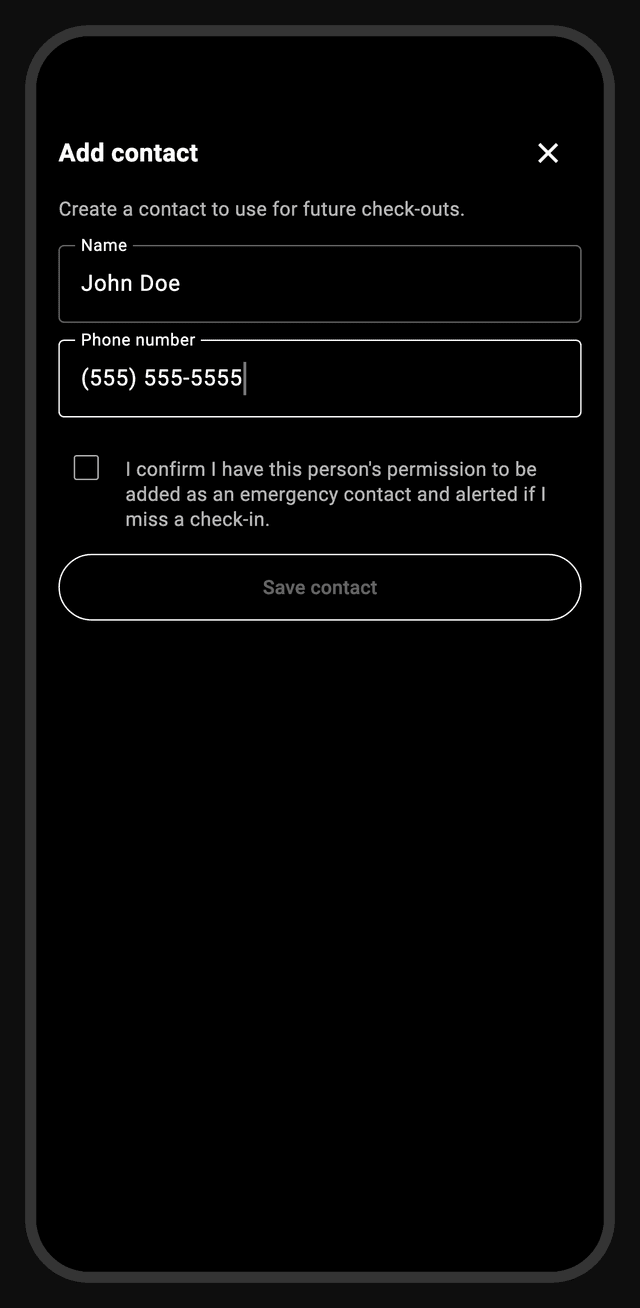
The contact then receives a one-time designation notice before any alert can reach them:
AvAI: John Doe added you as their emergency contact on AvAI, a backcountry safety app. If they miss a safety check-in, you'll get an alert with their last-known location. Reply YES to confirm (optional). Msg frequency varies. Msg & data rates apply. Reply STOP to opt out, HELP for info.
What the conversation looks like
The same opt-in, from the contact's side of the phone. Replying YES is optional; when a contact does reply, they receive a short confirmation.
Every message in the program is governed by the terms of service and the privacy policy.
YES, STOP, and HELP
- YES — an optional acknowledgment. Alerts flow by default once a contact is designated; no confirmation is required, because a safety alert that waits on a reply is not a safety alert. A contact who does reply YES receives the confirmation message shown in the conversation above.
- STOP — opts the number out of all AvAI messages, including real safety alerts. Honored immediately and retained permanently as a suppression record. The user who designated the contact is notified so they can arrange other coverage.
- HELP — returns the program-details reply:
AvAI backcountry safety alerts by Rocky Mountain Digerati. This number messages you only if an AvAI user listed you as their emergency contact, and only about their safety. Msg frequency varies. Msg rates apply. Support: support@rmdig.ai or rmdig.ai. Reply STOP to opt out.
Message types & frequency
- The one-time designation notice (above)
- A per-outing availability request, when a user lists you for a specific trip
- Overdue alerts — the user missed their check-in; includes last-known location
- Escalation and follow-up alerts while an overdue situation is unresolved
- All-clear notices once the user checks in safe
Frequency varies and is entirely event-driven — messages are triggered only by the designating user's safety activity. Message and data rates may apply. Emergency alerts intentionally omit the STOP footer to keep life-safety content unambiguous; STOP is honored from any message at any time. Delivery favors sending an alert twice over not at all, so occasional duplicates are possible by design.
Your information & the fine print
No mobile information is shared with third parties or affiliates for marketing or promotional purposes. What we hold about contacts and how to request deletion is covered in the privacy policy (see "Were you added as someone's emergency contact?"), the program's contractual terms in the terms of service, and what to do when an alert arrives at rmdig.ai/alerts. Questions: support@rmdig.ai.